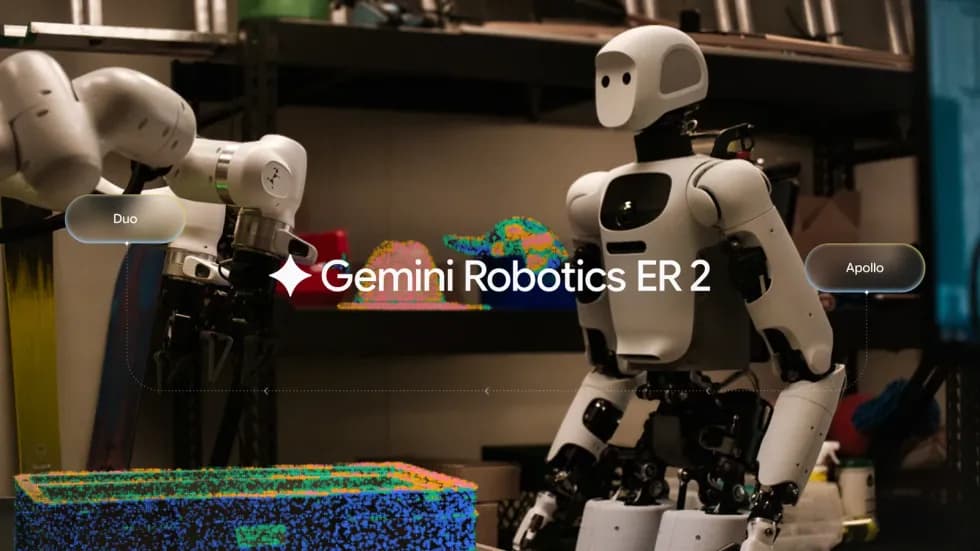
Google DeepMind publicó el 13 de octubre una serie de ejemplos de Gemini 4 Argon aplicado a la robótica. Según la compañía, el modelo da un salto en comprensión física, generación de código y razonamiento visual y semántico, lo que abre nuevos flujos de trabajo en toda la pila robótica y acelera el avance hacia una AGI física.
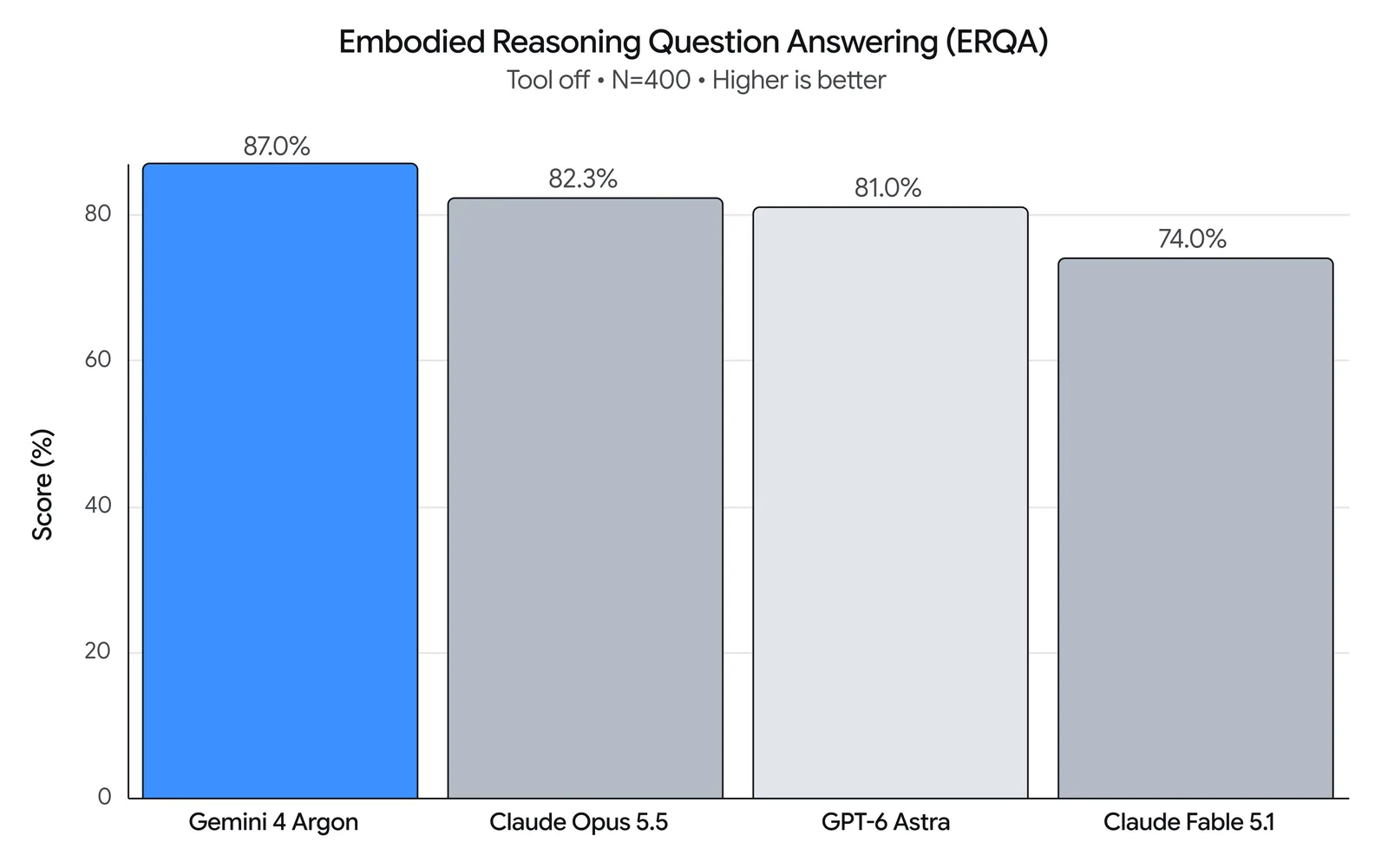
El salto se ve en el benchmark Embodied Reasoning (ERQA), que mide la capacidad de un modelo para entender y resolver problemas físicos y espaciales en entornos 3D. Solo con razonamiento, Argon obtiene 87%, por encima de todos los demás modelos de frontera, de acuerdo con DeepMind.
Como modelo de razonamiento físico de uso general, Argon se puede aplicar en todo el ciclo de vida de un robot. DeepMind compartió prompts representativos en cuatro áreas.
- Control de robots. Manipulación móvil con práctica en MuJoCo, control de robots sin entrenamiento previo (zero-shot) y dirección en lazo cerrado de modelos de mundo de video.
- Real2Sim. Reconstrucción de gemelos de simulación calibrados físicamente a partir de las cámaras del robot, de video humano en primera persona o de bocetos dibujados en papel.
- Comprensión física. Etiquetado retrospectivo multimodal y agéntico, con comprensión detallada de la destreza, funciones de valor densas y estimación de avance.
- Investigación y automejora. Mejora de acciones mediante simulación y automejora iterativa sobre hardware.
¿Cómo controla Argon a un robot?
1. Manipulación móvil con Spot, botar latas con práctica en MuJoCo
Argon controla un cuadrúpedo Spot de Boston Dynamics (patas de 12 grados de libertad y un brazo de 6) para aprender una habilidad nueva, pisar el pedal de un basurero para botar latas de bebida. Argon crea un gemelo digital articulado del basurero de pedal en MuJoCo y practica los movimientos antes de pisar el pedal real y soltar las latas dentro del basurero abierto.
En la secuencia, Spot recoge la lata, revisa la cámara de su muñeca, practica en MuJoCo el equilibrio en trípode sobre tres patas, pisa el pedal, verifica que la mano quede centrada sobre el basurero abierto y suelta la lata adentro.
There's a Diet Coke can behind you and another on the black table on your left.
Use the spot-mobile-manipulation skill to pick them up and trash them in the black foot-pedal bin.
Before stepping down on the pedal, verify in the front cameras that your front-right foot target is centered on the pedal, and use a 2-agent verification swarm (foot-verifier and hand-verifier) to verify both the foot-pedal step and the 3D hand-in-bin alignment before releasing.
2. Control zero-shot
Argon controla un brazo robótico simple para enderezar una taza caída y meter adentro una servilleta arrugada. Para hacerlo en varios turnos, razona con un sistema de coordenadas visuales y con primitivas de acción.
Las imágenes muestran a la izquierda la vista del robot real en tercera persona, y a la derecha la cámara de muñeca calibrada, con coordenadas del mundo proyectadas cada 2 cm y una retícula que marca el cierre de la pinza.
[Attached: wrist_cam.png, obs.json]
Task: Get the robot arm to reorient the mug upright and put the napkin inside the mug.
## Execution Discipline
- Simply output 1 sentence observation followed immediately by your `curl` command (with `# Plan:` on Turn 1 and `# Thought:` on every turn). Everything needed is in `obs.json` and the calibrated reticle/grid drawn on `wrist_cam.png`.
!
## Visual Coordinate Reference (Annotated on wrist_cam.png)
- `+X` (UP in image): Away from robot base | `-X` (DOWN): Towards robot base
- `+Y` (LEFT in image): World left | `-Y` (RIGHT): World right
- `+Z`: Height above table | `Yellow numbers`: World (X, Y) in centimetres (2 cm grid at `grid_z`)
- `Cyan + crosshair`: Current 3D pinch center
- `Cyan [ + ] brackets`: Current jaw opening and closing line
- `Green line`: Current object long-axis orientation (`yaw_deg`: 0° = vertical along +X, 90° = horizontal along +Y)
- `pitch_deg = 90°`: Straight down (-Z) top-down grasp/place; `pitch_deg < 60°`: Tilted coaxial approach along finger axis
## Closed-Loop Turn Workflow
1. Inspect current state & view `wrist_cam.png`:
`curl -s http://127.0.0.1:8081/obs` (returns `ee_pos`, `holding`, `status`, `workspace`, `wrist_cam_path`).
2. Select VLM call granularity upfront on Turn 1:
- Coarse (2–4 calls): `look_at` -> `grasp` -> `place` -> `done`
- Pre-Grasp Hover Verify (4–7 calls): `look_at` -> `goto(z=0.04)` (verify cyan `[ + ]` brackets straddle target) -> `grasp` -> `place_until_contact` -> `done`
- Fine Visual Servoing (8–20 calls): `look_at` -> `grasp` -> pre-pose `goto` -> closed-loop `move_by` / `move_until_contact` -> `done`
3. Send motion primitives (`POST /plan`) and verify visually after every turn in the updated `wrist_cam.png`. If `status == "grasp_failed"`, call `robot.look_at(...)` to re-observe and recover closed-loop.
## Code-as-Policies Primitives (`POST http://127.0.0.1:8081/plan`)
robot.look_at(x=0.35, y=0.13, z=0.14, grid_z=0.015)
x, y = robot.deproject(u=0.52, v=0.48, z_plane=0.015)
robot.grasp(x=x, y=y, z=0.015, yaw_deg=-35, pitch_deg=90)
robot.place(x=0.24, y=0.06, z=0.075)
robot.place_until_contact(x=0.24, y=0.06, z=0.015, max_lag=0.012, relief=0.002)
robot.goto(x=0.28, y=0.05, z=0.04, arc_z=0.14, pitch_deg=25, azimuth_deg=90, roll_deg=0, speed=0.10)
robot.move_by(forward=0.025, dz=-0.002, dpitch_deg=-3, droll_deg=5, speed=0.04)
robot.move_until_contact(dz=-0.06, speed=0.03, max_lag=0.012, relief=0.002)
robot.open_gripper() / robot.close_gripper() / robot.home() / robot.done()3. Control con Omni
Argon dirige robots dentro del modelo de mundo Gemini Omni para reordenar cinco fichas de Scrabble dispersas (G, R, A, N, O) en una fila limpia que dice A - R - G - O - N. En vez de definir un prompt estático, Argon dirige en un lazo visual cerrado. Escribe prompts de acción con marcas de tiempo, revisa fotogramas clave intermedios de cada simulación y refina sus instrucciones. La secuencia final que muestra DeepMind tiene 33 pasos dirigidos con manos diestras.
Goal: {task_goal}

You are steering a video world model (Gemini Omni) in an iterative visual feedback loop. Inspect the attached frames from the latest rollout and write the next timestamped action prompt for the video world model:
- Break complex motions into one simple, single-direction action at a time.
- Keep inactive hands retracted and avoid blocking the camera's view of objects in the workspace.
- Explicitly state which areas of the workspace become empty after an object moves.
- Use [MM:SS.mmm] timestamps for each action beat and wrap your output in <omni_prompt> tags.

Example format (sample timestamps only, not the full prompt):
<omni_prompt>
[00:00.000] Character A's left hand rests at the side while the right hand reaches toward the target object.
[00:02.500] Character A's right fingertips push the object smoothly into the center of the table, leaving its starting area empty.
[00:05.000] Character A's right hand opens and retracts to the side so all placed objects remain in clear view of the camera.
</omni_prompt>
Real2Sim con Argon
1. De la vista del robot a la simulación
Argon observa un episodio de teleoperación de un robot real y arma un gemelo digital. Consigue o crea recursos de simulación que se ven y se comportan como los objetos reales al entrar en contacto con las manos diestras. Luego ajusta los recursos y las escenas, en un lazo de razonamiento visual iterativo, hasta que la imagen y los eventos de contacto de la simulación coinciden con los datos reales grabados.
A la izquierda se ven las cámaras sincronizadas del robot real, y a la derecha la escena 3D de MuJoCo que Argon reconstruyó y calibró.
[Attached: robot_rollout_episode]

Build a MuJoCo scene of the robot and reconstructed task objects. When each episode is replayed frame by frame, by driving the robot joints toward the logged observation.state with joint-space PD.

Iterate using two verification objectives:
(1) Visual match: MuJoCo renders from the head_left, left_wrist, and right_wrist cameras line up with, and look like, those real observations.
(2) Physical match: the simulated contact force/torque on each Sharpa fingertip, in the sensor frame, matches the logged tactile_force in timing, magnitude and direction.

What you can tune happens before simulation starts:
(1) Static object assets: realistic geometry, collision shapes, mass, inertia, friction and joints, with appearance close to the real objects, plus the initial object poses at t = 0.
(2) Offline-planned robot commands, changed only in frames where the real fingertips are near an object. Each command must stay within 0.55 rad (arm joints) and 0.65 rad (hand joints) of the logged teleop trajectory. Everywhere else, replay the logged trajectory unchanged.

No sim cheating: task objects may move only through real MuJoCo contact with the robot hands and the environment (mj_step).
Not allowed after t = 0: changing MjModel parameters; applying external forces or torques to objects; welds or equality constraints; feedforward torques beyond joint-space PD; setting or rolling back object qpos/qvel; disabling or excluding collisions; reporting contact forces that don't come from the MuJoCo solver (for example, copying the logged tactile readings).

Immediately present the reconstructed scene and rollout results as an interactive HTML session viewer with one page per episode, showing:
- At the bottom: A synced timeline (play, scrub, speed control) that drives every panel.
- On the left panel: An interactive 3D Blender scene showing the simulated robot and objects, showing contact points and force arrows as replay progresses.
- On the right panel: Real vs. sim camera views side by side for all 3 cameras. Real vs. sim finger force visualizations.
2. De la vista humana a la simulación
A partir de un video en primera persona de una persona manipulando objetos, Argon identifica los objetos relevantes para la tarea y reemplaza las cajas delimitadoras toscas por mallas compuestas con descomposición convexa para los recipientes cóncavos. Después traslada la trayectoria de la mano humana a un humanoide bimanual de 76 grados de libertad con manos de cinco dedos de 22 grados de libertad, dentro de la física de contacto de MuJoCo.
A la izquierda está el video RGB humano en primera persona usado como entrada, y a la derecha la simulación multivista sincronizada a 500 Hz en MuJoCo, renderizada con Blender Cycles.
[Attached: egocentric_human_video.mp4, candidate_sim_views.png, hand_3d_keypoints.json]

You are building a physically solvable 500 Hz MuJoCo manipulation environment (`scene.xml`) and studio Blender render that faithfully reproduces the tabletop task shown in `egocentric_human_video.mp4` on a bimanual humanoid robot with 22-DoF dexterous five-fingered hands:

1. Scene Reconstruction & Camera Calibration:
   - Identify only the manipulation-relevant objects (the grasped target object and the receiving container or landmark) and triangulate their 3D tabletop coordinates from the egocentric camera intrinsics/extrinsics.
   - Replace crude bounding boxes with compound convex-decomposed 3D meshes so concave containers (nested bowls, recessed wooden trays, open bins) support physical interior placement.

2. 500 Hz Dexterous Motion-Fitting Stress Test:
   - Retarget the 3D human wrist and finger keypoints to the humanoid's 7-DoF arm and 22-DoF hand joints, and step the trajectory in MuJoCo at 500 Hz (dt = 0.002s) with zero kinematic weld constraints.
   - Verify opposing thumb-and-finger force closure, clean object lift (> 2 cm), and stable final placement inside or beside the target landmark.
3. Del boceto a la simulación
Con Argon, un desarrollador puede sacarle una foto a un boceto tosco hecho con lápiz y papel, en que un humanoide Apollo 2 lanza una pelota en arco parabólico para derribar una pila de cajas de 3, 2 y 1 sobre una mesa. Argon construye de forma automática la escena acelerada por GPU en mujoco_warp, sintetiza una trayectoria de lanzamiento equilibrada para el cuerpo completo de 76 grados de libertad y los cinco dedos, verifica en física de lazo cerrado que caen los 6 de 6 objetivos y exporta un render en Blender 4.5 Cycles.